Staff Edition

UCDC / UCOP Account & Login Reference Guide

Staff Edition · UCDC and UC Federal Governmental Relations

UCDC staff use UCDC-managed computers and do not sign in to UCOP workstations. Use your UCDC account for the computer and UCDC-managed services; use your UCOP account only for the UCOP web, cloud, business and network services listed in this guide. For UCOP Microsoft products, sign in as jcalifornia@ucop.edu. For all other UCOP services, sign in as jcalifornia only.

Version 1.3Updated 2026-09-12

Section

Which account do I use?

The one rule to remember — choose UCDC, UCOP, email alias, or a separate app account.

UCDC ACCOUNT

UCDC

jcalifornia@ucdc.edu

Use for UCDC Microsoft 365, UCDC email, UCDC network access and UCDC-managed services.

UCOP ACCOUNT

UCOP

jcalifornia

Use for UCOP web, cloud and business services. Microsoft products (Outlook, Microsoft 365, OneDrive, SharePoint, Copilot) use jcalifornia@ucop.edu. All other UCOP services use jcalifornia only — do not add @ucop.edu.

UCOP EMAIL ALIAS

Alias

firstname.lastname@ucop.edu

Usually your email/display address. Do not assume it is your login ID. GoAnywhere is one documented exception.

SEPARATE APP ACCOUNT

Separate

Varies by application

Use the account issued or created specifically for UCRAYS, Cascade, UCARS, UCOP Shop or another separately provisioned system.

Section

Fast sign-in decision guide

Match what you are signing into with the correct account and username format.

UCOPOpen

Username

Short UCOP username only, e.g., jcalifornia — do not enter jcalifornia@ucop.edu

MFA

Yes - Duo after this screen when the service requires it

Contact

UCOP IT Service Desk

This is a sign-in page, not a separate app. It appears as a pop-up or redirect when you open a UCOP service.
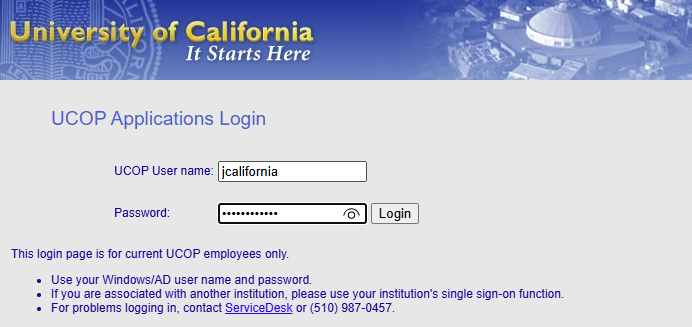
UCOP Applications Login. Enter jcalifornia only. Do not add @ucop.edu.

UCDC Microsoft 365, email, Teams, Wi-Fi or UCDC IT portals

UseUCDC

EnterUse your assigned UCDC account. For Microsoft services, enter the full UCDC sign-in ID.

UCOP Microsoft products (Outlook, Microsoft 365, OneDrive, SharePoint, Copilot)

UseUCOP

Enterjcalifornia@ucop.edu.

All other UCOP services (Box, Zoom, ServiceNow, UCPath, Concur, VPN, LastPass, and the UCOP Applications Login page)

UseUCOP

Enterjcalifornia only. Do not add @ucop.edu.

OPnet Wi-Fi or UCOP VPN

UseUCOP

Enterjcalifornia. This is UCOP service access, not a UCOP computer login.

GoAnywhere Secure Messaging / MFT

UseUCOP

Enterjcalifornia on the UCOP Applications Login. If an earlier screen asks for an email address, use the UCOP email alias, then continue with jcalifornia.

UCRAYS, Cascade, UCARS or UCOP Shop

UseSeparate

EnterUse the application-specific account/username described in this guide.

Section

UCDC core services

UCDC-managed identity, Microsoft 365, and network access.

UCDCOpen
UCDCOpen
UCDCOpen
UCDCOpen
UCDCOpen
UCDCOpen
UCDCOpen
UCDCOpen
Home campusOpen

Section

UCOP core technology services

UCOP SSO, Microsoft 365, collaboration, network, and staff productivity services used by UCDC staff.

UCOPOpen
UCOPOpen
UCOPOpen
UCOPOpen
UCOPOpen
UCOPOpen
UCOPOpen
UCOPOpen
UCOPOpen
UCOPOpen
UCOPOpen
UCOPOpen
UCOPOpen
UCOPOpen
UCOPOpen
UCOP / role-specificOpen

Section

HR, payroll, training & retirement

UC employee self-service, performance, time reporting, and retirement systems.

UCOP / UC locationOpen
UCOP / UCPathOpen
UCOPOpen
UCOPOpen
Separate application accountOpen
Public site / linked services varyOpen

Section

Finance, procurement & travel

UCOP financial administration, expenses, travel, and procurement platforms.

UCOPOpen
UCOPOpen
UCOP / UC locationOpen
UCOPOpen

Section

Staff sign-in rules

Use these rules before creating or resetting an account.

  1. 1UCDC computer and UCDC-managed services: Use the UCDC account issued by UCDC IT.
  2. 2UCOP Microsoft products (Outlook, Microsoft 365, OneDrive, SharePoint, Copilot): sign in as jcalifornia@ucop.edu.
  3. 3All other UCOP services: sign in as jcalifornia only. Do not add @ucop.edu. That includes the gray UCOP Applications Login page.
  4. 4UCOP email alias: Do not assume firstname.lastname@ucop.edu is the login ID. It is commonly the mail/display address.
  5. 5GoAnywhere: if a first screen asks for an email address, use the UCOP email alias, then enter jcalifornia on the UCOP Applications Login.
  6. 6Separate-account systems: UCRAYS, Cascade, UCARS and UCOP Shop use separately created or provisioned credentials.
  7. 7When a protected application offers Sign in with SSO / UCOP / Office of the President / Organizational Account, use that institutional option instead of creating a new personal account.

Section

Support contacts

Who to contact for UCDC and UCOP account, password, and system help.

Section

Official reference pages

Source pages used to validate this guide.

UCDC / UCOP Account & Login Reference Guide | UCDC IT Guides